
The first time you open the Amazon Advertising Console, it feels bigger than the job you actually came to do. Campaigns, reporting, billing, creative tools, brand features and account settings all live in the same environment, and nothing tells you which of those you genuinely need on day one.
This is the complete picture: all seven core areas, what each one is actually for, and two real 2026 changes worth knowing about — one of them widely misreported, the other barely covered anywhere yet.
A quick scope note: the details below apply broadly across marketplaces, but exact menu labels and payment options can vary a little by country and account type. If something here doesn’t quite match what you’re seeing, that’s usually why — check your own account rather than assuming the guide is wrong.
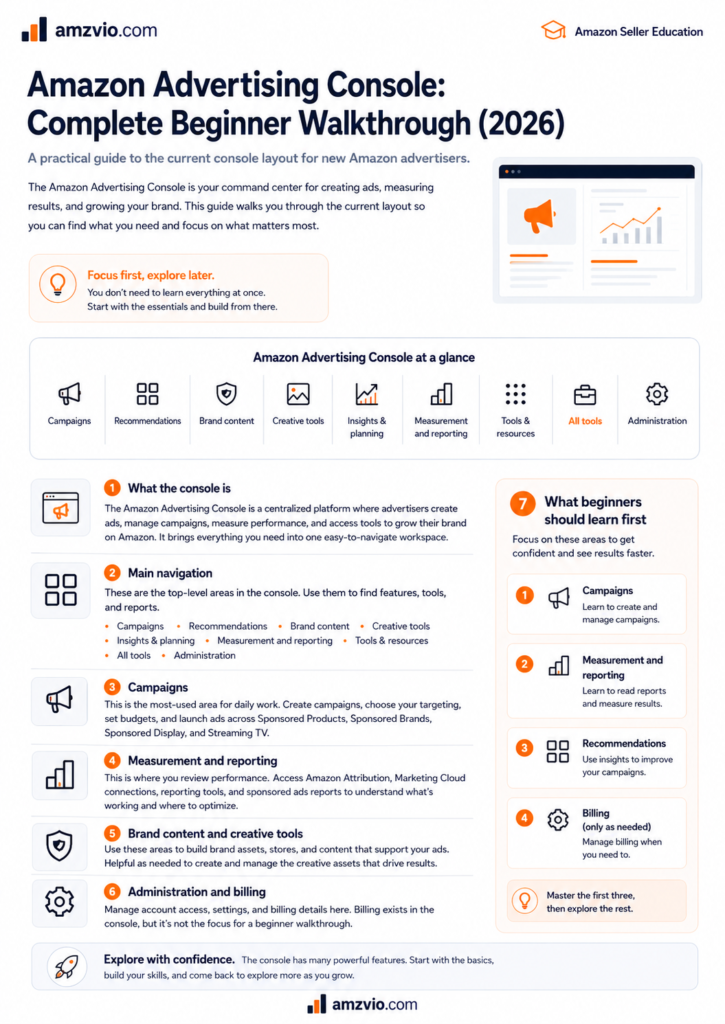
What the console actually is
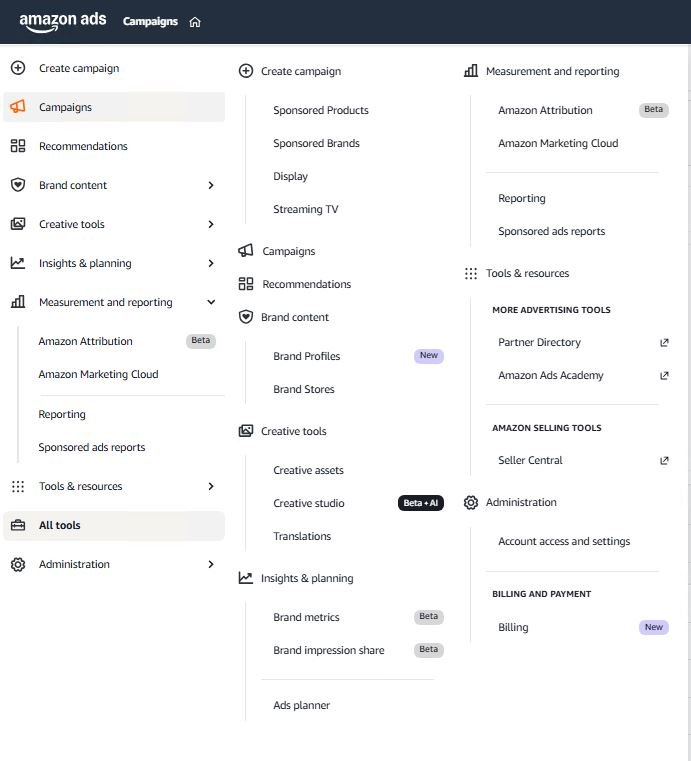
Think of it less as a single dashboard and more as an operating system for your advertising. Campaign Manager is where you’ll spend most of your time, but reporting, billing, creative tools, and account administration all sit around that core, supporting it rather than competing with it for your attention.
You can get in three ways: through Seller Central if you’re a third-party seller, through Vendor Central if you’re a vendor, or directly at advertising.amazon.com if you manage more than one brand or work across accounts. That third route is worth knowing about even if you’re not using it yet — the account switcher alone saves a lot of logging in and out once you’re juggling more than one advertiser.
Before you touch a single bid: confirm the account and marketplace
This is the fastest way to make a confidently wrong decision, and it happens more often than you’d think. A campaign named something generic like “Exact – Core” can exist in more than one country at once, and the currency, competition, and conversion economics behind that name can be completely different from one marketplace to the next.
Before you change a bid or read a number as good or bad, confirm three things: which advertiser or brand you’re looking at, which marketplace, and what date range. If you’re active in more than one country, never combine screenshots or conclusions across them without saying so explicitly — a USD number and a GBP number sitting side by side without a label is how good decisions get made on bad information.
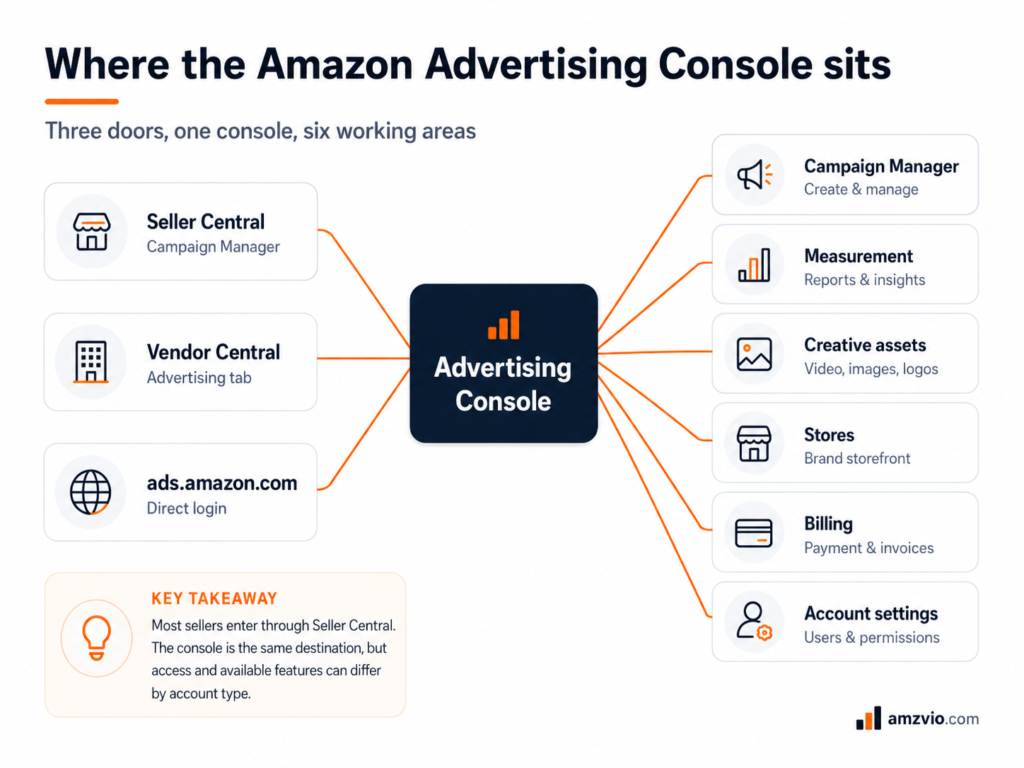
The seven core areas, in the order you’ll actually need them
1. Campaign Manager — your daily workspace
This is the console, in the sense that everything else is supporting cast. Campaign Manager is where campaigns get built, budgets and bids get changed, campaigns get paused or turned back on, and where you drill down into ad groups, targets, and search terms.
The skill worth building early isn’t clicking every setting available — it’s learning to move through the hierarchy without losing your place: account, then campaign, then ad group, then targeting or keyword, then the actual shopper search term underneath it. That’s the exact path you’ll follow every time you’re trying to work out why money is being spent and whether it’s being spent well.
2. Measurement & Reporting — where this changed in June 2026
Campaign Manager is good for checking what’s happening right now. Reports are what you use for structured analysis, comparisons, and anything you’re pulling into a spreadsheet.
Here’s the part worth knowing if you haven’t logged in for a while: unified reporting went generally available on 8 June 2026. It lets you build a single report spanning multiple advertiser or manager accounts, ad products, and countries at once, with up to six years of history available — something that used to mean stitching together separate exports by hand.
The old reports are on a clock
Amazon is retiring the legacy Sponsored Ads reports and Amazon DSP reports pages on 31 December 2026. If you have anything scheduled through either of those, it’s worth migrating to unified reporting well before the deadline rather than waiting for the automated migration tool Amazon has mentioned but not yet dated.
For anyone learning the console fresh right now, there’s genuinely no reason to learn the old report pages at all — start with unified reporting directly, since that’s what you’ll be using in a few months regardless.
3. Products & targeting views — for when the summary hides the problem
A campaign can look perfectly fine in total while one product, keyword, or target inside it is quietly eating most of the budget. This is where product-level and target-level views earn their keep: they let you see the components a blended campaign number is hiding.
A concrete example: say a campaign is advertising five products. Four are converting profitably, and one is spending heavily with almost nothing to show for it. Cutting the whole campaign’s bid to fix that one weak product also slows down the four that were working fine. Look at the product level before you touch anything campaign-wide.
4. Creative tools & assets — important, but not a daily screen
A shared library for logos, images, and video used across the ad formats that need them. You’ll reach for this far more when running Sponsored Brands, video, or other creative-led formats than when managing straightforward Sponsored Products campaigns, where your existing listing images already do the job.
Where this sits in your priorities depends on what kind of seller you are, which is worth calling out directly rather than treating everyone the same.
5. Brand Stores — useful, not a prerequisite
Brand Stores give registered brands a multi-page shopping experience inside Amazon, and you’ll need Brand Registry to access both Stores and Sponsored Brands. You can still run Sponsored Products perfectly well without ever building one, provided your account and products meet Sponsored Products’ own eligibility rules.
One thing worth being honest about: a Brand Store doesn’t automatically convert better than a plain product page. Performance depends on where the traffic comes from, what the shopper was looking for, and how well the Store itself is merchandised. Treat it as a destination you measure, not a feature you install and forget.
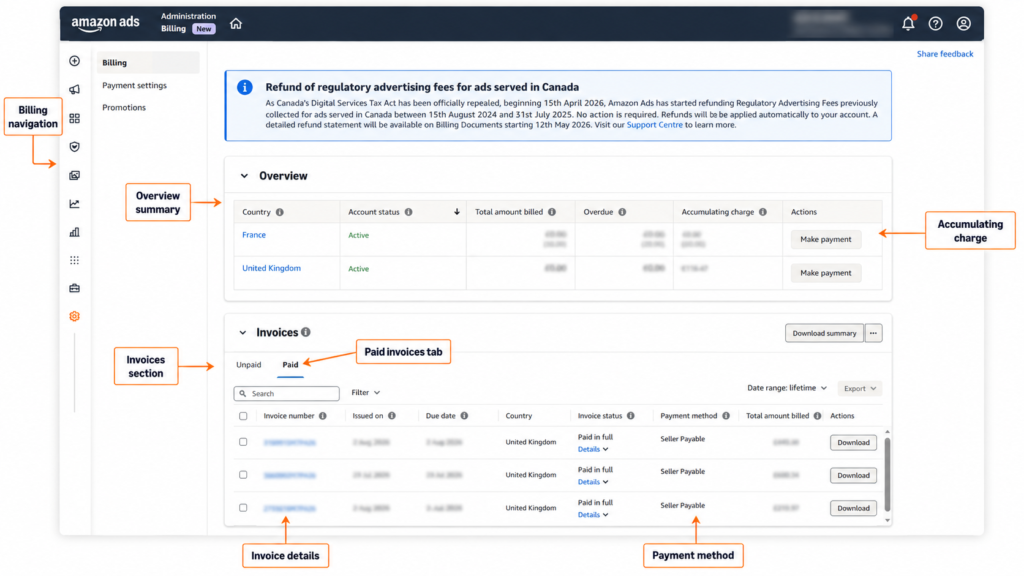
6. Billing & payment settings — check this before you diagnose anything else
Amazon doesn’t use one universal payment method for every seller. Depending on your account and its configuration, you might be paying by card, by deduction from your available seller or vendor balance, or by invoice. Whichever one is your current default is what actually matters for your account — not what you assume is standard.
Now, the correction. The August 2026 change that caused so much noise online did not apply to sellers broadly. In Amazon’s own words, “this update applies only to the small group of advertisers who have been contacted directly.” That group was originally told the change would land on 15 April 2026; after visible pushback, including a one-day advertiser boycott, Amazon deferred it to 1 August specifically to give that group more time to prepare.
If you were part of that contacted group and didn’t actively choose a preference, your default moved to deduction from your available seller or vendor balance, with your existing card kept on file purely as a backup for when that balance runs short. The alternative, if you’d rather keep more of a buffer, is Pay by Invoice — Amazon invoices you at the end of each month, due 30 days later. Worth knowing: Amazon says account-balance payment was already how the overwhelming majority of advertisers were paying, long before this specific group was contacted.
Check your own settings rather than assuming
If you were never contacted directly about this change, it doesn’t apply to you — your billing is whatever it already was. Payment methods can differ by seller, vendor, KDP, or enhanced advertiser account type, and you’re billed in the currency of the marketplace where the ad was created. The only reliable answer is your own Billing settings, not a general rule from an article.
One practical, separate point: if a payment method fails repeatedly, the account can move into a payment-failure status and campaigns get paused. So billing status genuinely belongs on your diagnostic checklist when something stops serving — it just shouldn’t be your first assumption for every zero-impression campaign, the way it’s become since this story spread.
7. Access & settings — permissions, not shared passwords
When someone else, an employee, freelancer, or agency, needs into your account, use Amazon Ads’ own access and permissions system rather than handing over your Seller Central login. If you’re managing several advertisers or brands, a manager account is worth setting up specifically so your team can work across all of them from a single sign-in.
Set up useful columns before you optimise anything
A genuinely common mistake at every experience level: staring at ACoS and immediately reaching for the bid slider. ACoS tells you how efficient a campaign was. It doesn’t tell you why it looks that way, and reacting to it alone means you’re often changing the wrong thing.
Build a column set that lets you read visibility, traffic, conversion, and efficiency together, not just the one headline number.
| Metric | What it tells you |
| Impressions | Visibility — if this is very low, check eligibility, targeting, bids and budget before judging anything about conversion |
| Clicks | Traffic — read alongside impressions and CTR to see if visibility is converting to visits |
| CTR | Ad or query appeal — low CTR can mean weak relevance, but context matters by placement |
| Conversion rate | Separates a traffic problem from a listing or offer problem |
| ACoS | Ad spend ÷ attributed ad sales × 100 — your headline efficiency number |
| ROAS | Attributed ad sales ÷ ad spend — the same relationship, read the other way |
| Top-of-search impression share | The share of eligible top-of-search impressions you actually received |
Top-of-search impression share deserves a proper caveat
Amazon defines this metric as the percentage of top-of-search impressions your campaign received out of the total it was eligible to serve on. It’s genuinely useful, and Amazon itself notes that placement bid adjustments can help improve your odds here.
What it doesn’t mean is that every low impression-share number is purely a bidding problem. Eligibility, budget, relevance, competition, and how retail-ready your listing is all influence whether you win these impressions. Use it as a clue that sends you looking further, not as a verdict that the fix is always “bid more.”
A 15-minute setup for a new or inherited account
- Confirm advertiser and country. Check the account selector and marketplace before you trust any number on screen.
- Check billing status. Confirm the current default payment method and whether there’s any payment-failure warning sitting unnoticed.
- Choose a consistent date range. Thirty days works for routine review; use shorter windows for anything recent and longer ones for low-volume products.
- Save a diagnostic column set. Visibility, traffic, conversion and efficiency together — never ACoS alone.
- Open Measurement & Reporting. Confirm whether the account is already on unified reporting, and set up the reports you’ll actually check weekly.
How this looks different for private label versus wholesale
The console is the same for everyone, but what you do with it depends heavily on which kind of seller you are — and this is worth being specific about rather than giving generic advice that quietly assumes one or the other.
Private label
You control the listing, the images, the price, the brand assets, and the campaign strategy, which means you have more real levers to pull when something underperforms. A low CTR points you back to the main image, the price, or the offer itself. Low conversion points to the listing, the reviews, or genuine product-market fit. Your PPC data isn’t just an advertising report here — it’s part of the feedback loop for the product itself.
Wholesale
You typically have far less control over the detail page and the brand creative sitting on it. Your advertising decisions have to account for Buy Box or Featured Offer eligibility, competing sellers on the same listing, price stability, and inventory depth — and whether the numbers still work once advertising cost is added on top. A wholesale campaign can look technically profitable in isolation while the underlying ASIN is quietly becoming unsafe to keep advertising, because price competition on that listing is deteriorating underneath you. You will not able to run PPC till you win BuyBox.
Seven mistakes worth avoiding
- Treating one payment method as universal. Check your own Billing settings — the August 2026 change was never a platform-wide card ban.
- Optimising from ACoS alone. Read impressions, clicks, CTR, conversion, spend and placement visibility as a set, not a single number.
- Changing bid, budget, targeting and the listing all at once. If everything moves together, you’ll never know which change actually mattered.
- Comparing performance across the wrong marketplace. Currency and competition make cross-country comparisons genuinely dangerous unless you’ve deliberately built a cross-market report.
- Ignoring search-term data. Your targets are what you told Amazon to pursue; search terms show what shoppers actually typed. The gap between the two is where both waste and opportunity hide.
- Assuming a low top-of-search share always means the bid is too low. Eligibility, relevance, competition and retail readiness can all be the real constraint.
- Sharing your password with staff or an agency instead of granting proper account access and permissions.